

Noisy detections need narrow fixes, not off switches

Every security team has a detector that fires many times a day on the same harmless activity. The usual fix is to either disable the detector or create exclusions to minimize the amount of noise it generates. In either case, the “fix” is rarely undone. The exclusion often stays long after the behavior that was causing the noise is gone, and the detector that was turned off is rarely turned back on.
Daylight tunes noisy detectors differently. The fix comes from what is already known about the alerts, it is the narrowest change that works, and you see its result before anyone touches the detection.
A noisy detection costs you in one of two places
Not covered at all: A detection that fires dozens of times a day on known activity is too noisy to cover as it is. It gets switched off or ignored, and the attack it was designed to catch can go unwatched.
Covered, but not interesting: Daylight investigates every alert, so nothing is ignored. But when the cases keep closing as benign for the same reason, that's noise in your queue and potentially time wasted on benign activity. It’s also evidence that the underlying detection can be sharper.
Either way, the fix is already in the alerts. The two examples below show one of each.
The alerts already say what the noise is made of
For a detection that’s too noisy to realistically cover, Daylight examines the actual alerts and looks for what they have in common.
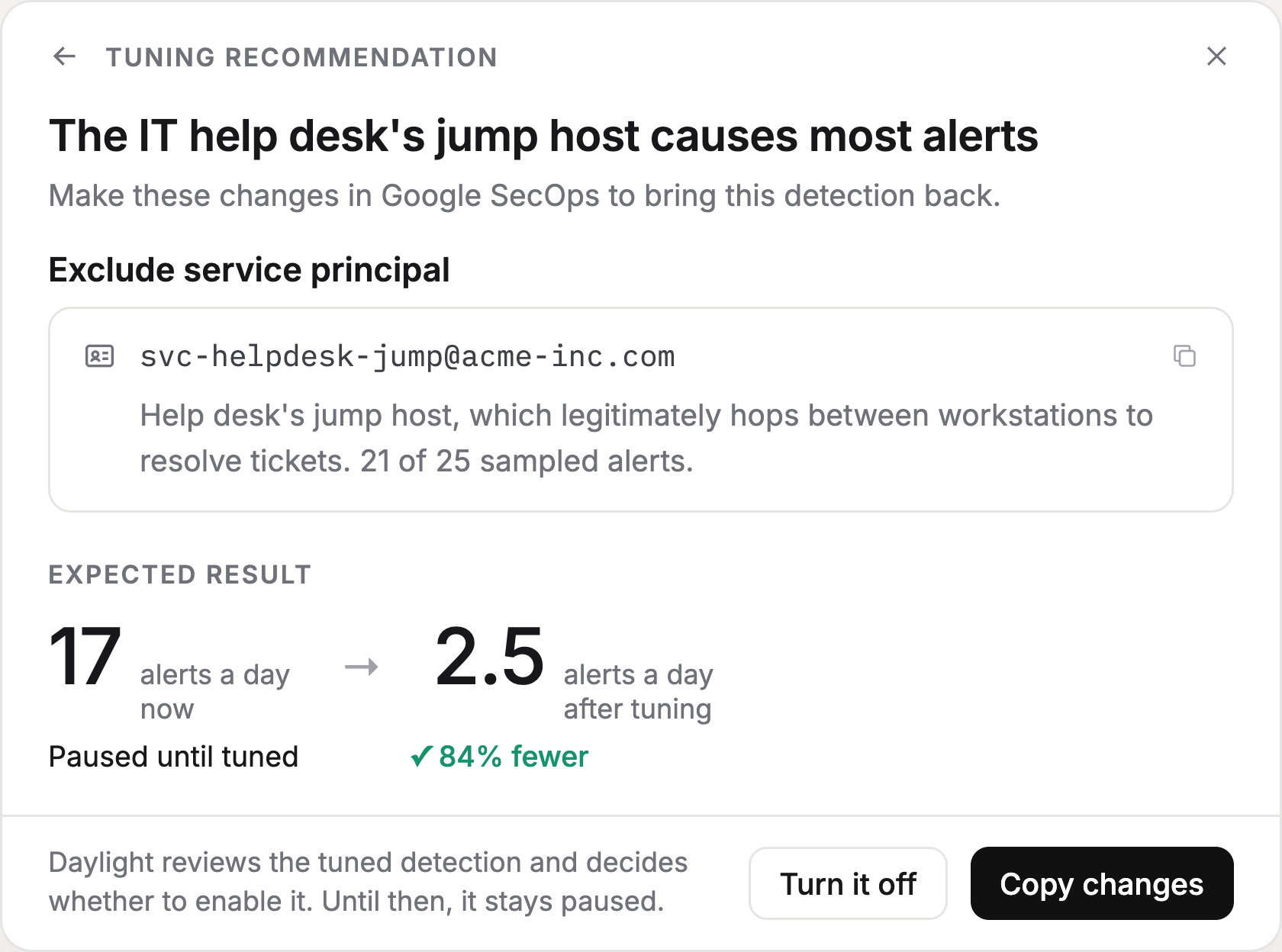
Take Lateral Movement via RDP, for example. It’s a custom detection meant to catch an attacker hopping from one machine to the next over the Remote Desktop Protocol (RDP). Let’s say it fires 17 times a day, creating too much noise to continually investigate. Of 25 sampled alerts, 21 came from one account, svc-helpdesk-jump: the account the IT help desk’s jump host uses, which connects to employees' workstations all day to resolve tickets.
The narrowest change, with its result up front
Our recommendation is to exclude the exact service account that’s triggering the alerts:
svc-helpdesk-jump@acme-inc.com
Not the help desk subnet, and not every account with "helpdesk" in its name. Any other account hopping between machines over RDP still triggers the detection, including an attacker on a compromised workstation. The other 4 sampled alerts weren't the jump host, so they stay in the detection and get investigated.
This example needs a single condition. Others need several, such as two automation roles, or an account combined with the host it connects from. Each condition is scoped as tightly as the evidence allows and comes with the reason it is safe to exclude.
The expected result is on the same screen: 17 alerts per day before the change and about 2.5 per day after the change, an 84% reduction in volume. You know what the change does before you make it.
Your team stays the owner of its detections. Daylight hands you the exact change, ready to paste into your rule (in Google SecOps in this case). Before you paste it, check who can sign in as the excluded account. An exclusion on a service account is only as safe as the list of people who hold its credentials.
When the cases keep closing for the same reason
For a detection that’s reliably catching benign activity but consistently closing for the same reason, the closed cases hold the answer you’re looking for. Every case Daylight closes as benign comes with a reason: Which user, role, or host did it, and why was it expected? Upon examination, you can usually determine what’s causing the noise.
Take Impossible Travel Login, which flags sign-ins that occur in close proximity (time-wise) but in geographically disparate locations. Let’s use an example where we closed 52 of our last 54 cases as benign. 31 of them had the same reason: The sign-in came through the company's own VPN exits in Frankfurt and Virginia, so a user in London looked like they were simultaneously in the US and in Germany.
The recommendation is to stop treating those exits as a location:
NOT cidrmatch(src_ip, 203.0.113.0/24)
That removes 31 cases that were never going to be interesting. The other 21 benign cases had different reasons, such as a mobile carrier IP that geolocates far away, and they continue to fire detections until a commonality emerges that enables tuning. A sign-in from an unknown country, or from a known one at an impossible speed outside the VPN, still opens a case and gets investigated.
Daylight checks the change before the detection comes back
Once you change the rule, Daylight reviews the tuned detection against its new alerts. When the change holds, the detection comes back into coverage and Daylight investigates every alert from then on. For a detection that was already covered, the result is fewer cases that close as benign, with the same coverage.
If noise remains, Daylight recommends what to tighten next, with the same evidence behind it, not a pile of exclusions added under pressure.
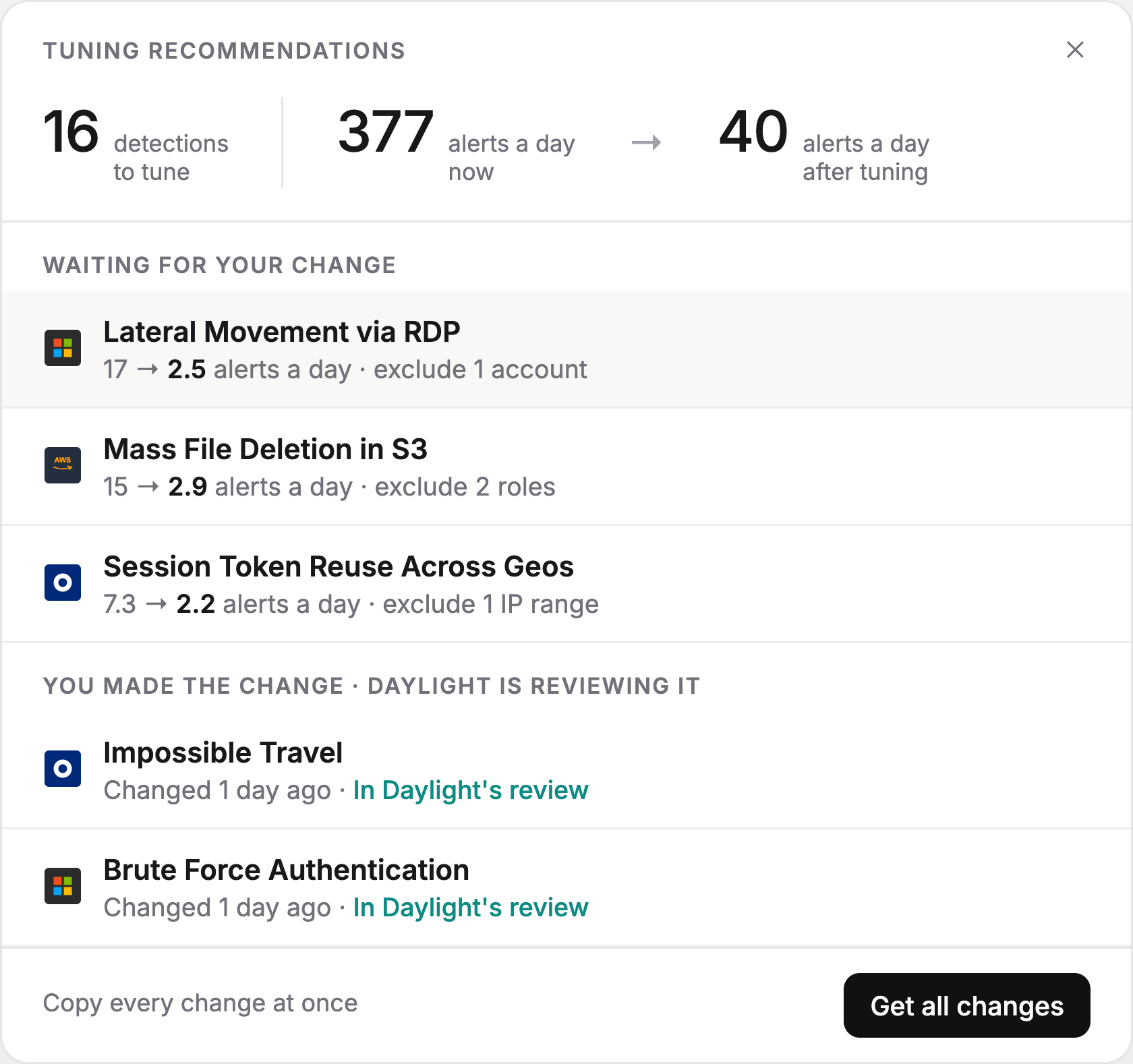
Across a whole environment, the same view adds up. In the example in these screenshots, 16 custom detections produce 377 alerts a day between them. With every recommended change made, that drops to about 40 per day, and 11 of those detections come back into coverage.
Questions to ask about your own detections
These are worth answering whatever tools you use:
- When was each exclusion added, and has anyone reviewed it since?
- Which exclusions match on something an attacker can control, such as a file path or a process name?
- For each excluded account, who else can sign in to it?
- Which detections did you turn off this year, and which techniques are now unwatched?
- Which of your detections close as benign for the same reason most of the time?
Already a Daylight customer? Open Detections, filter to Tuning is needed, and start with the noisiest one.
Not a customer yet? See it in a demo.
Subscribe to newsletter
Subscribe to receive the latest blog posts to your inbox every week.




Related posts




For expert judgment, scaled to your world, head for Daylight
