AI-Assisted Coding: Lessons from 100,000 Generations


.avif)
After three years and roughly 100,000 generations of AI-assisted code, I’ve learned that working with Large Language Models is less like programming and more like conducting an orchestra where half the musicians are genius savants and the other half are chaotic gremlins who occasionally set the sheet music on fire.
At Daylight, where our entire engineering culture embraces AI-native development, we’ve turned the chaos of AI coding assistants into something actually productive. Today, I’m sharing the hard-won wisdom that helps our team ship code with AI without losing our minds.
Your AI’s Memory: The Context Window Conspiracy
Let’s start with something that’ll save you hours of frustration: Your AI assistant has a context window, and how you manage it determines whether you get helpful code or hallucinated nonsense.
Here’s what nobody tells you: Your AI’s previous context affects everything that comes next. Feed it confusion, get confusion. Feed it clear structure, get clear code. But here’s the kicker: even with the latest million-token context window, your AI pays way more attention to the beginning and end of your conversation than the middle.
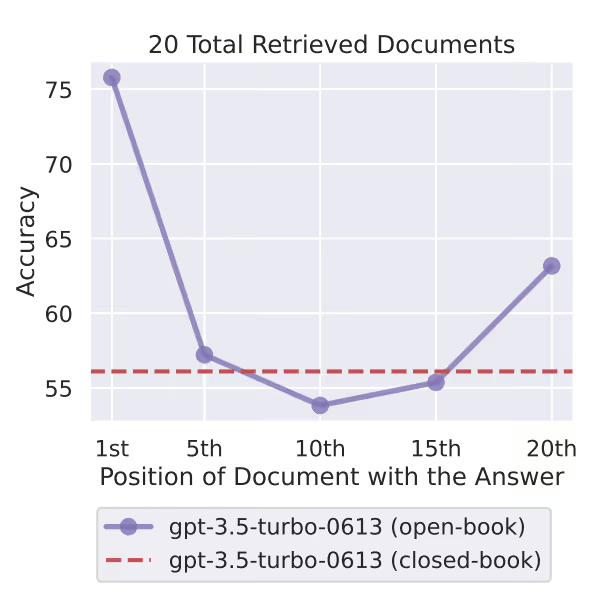
Research from 2024 found that when important information sits in the middle of a long context, accuracy drops from 90% to 30%. It’s like your AI has perfect memory for “Hello” and “Goodbye” but kind of spaces out during the actual meeting.
What happens when context gets too big? Your AI starts mixing things up. That user validation function you defined 50 messages ago? It’s now authenticating refrigerators. That specific error handling pattern you carefully explained? Replaced with a try-catch that catches feelings instead of exceptions.
The sweet spot? Keep your active context fresh (roughly 20–25 files of code). Beyond that, you’re not getting smarter responses, you’re getting creative writing. And here’s the technical bit that matters: the self-attention mechanism that makes LLMs work has quadratic complexity.
In human terms: double your input, quadruple the confusion. That’s not just slower, it’s exponentially more likely to forget that critical type definition you pasted 20 messages ago.
Real Story from the Trenches: The 15 Minute Lambda Miracle
It was 11 PM when my Zoom notification went off. Suspicious timing. “What’s up?” I asked.
I can hear the infra guy and one of the developers cackling in the background. “We have a cloud architectural issue and need to set up computing that can sync between buckets across multiple accounts.”
That moment, I knew we were in for a late-nighter. As it happens, I’m a serverless enthusiast who had already set up serverless infrastructure for my own selfish LLM experiments. “OK, give me the full details. Explain it slowly.”
TL;DR: We needed to set up a Lambda with specific inputs, certain permissions, and make it production-ready before sunrise. But secretly, I’d been ready for this moment my entire… 4 months at the company.
I opened Cursor. My repo was organized to perfection. My 8 extensive Cursor rules detailed EVERYTHING — from structure to typing, error handling to conventions, testing to linting. My prompt was simple: detailing the inputs, what we’re trying to achieve, what the functionality should look like, how we want streaming (not storing everything in memory).
We started with a detailed plan for the LLM. It looked solid. We gave it a go.
A few minutes later: 11 generated files.
I braced for “oh no way it generated something useful” We reviewed the code. It actually looked solid. The only thing left was to deploy and test.
That Lambda? Still running in production today with zero issues. Not a single bug report. Not one 3 AM page.
The lesson? When your context is perfect, your rules are clear, and your planning is solid, AI doesn’t just assist — it absolutely delivers. But it took 4 months of perfecting my setup to make that 11 PM miracle possible.
The Planning Journey: Because “Just Do It” Is Not a Development Strategy
Every LLM objective should start with planning. Not the “I’ll figure it out as I go” kind, but actual planning that de-risks your AI’s ability to turn a simple refactor into an archaeological excavation.
Research from Kojima et al. (2022) shows that simply adding “let’s think step by step” to your prompts can increase success rates from 17.7% to 78.7% on reasoning tasks. That’s a 61-point difference from five words. If that doesn’t make you rethink your prompting game, I don’t know what will.
While indeed latest reasoning models are implementing this practice internally, there are still multiple benefits to applying it, as indicated in Anthropic’s official docs.
The Battle-Tested Planning Protocol
1. Explain the task at a high level first
Give your AI the full picture with actual specifics:
"We have a user service in services/user.go that handles authentication.The JWT tokens are managed in auth/token.go.We store sessions in Redis using the cache package."
Not: “Fix the login.” (Unless you enjoy surprises)
2. Share your approach (unless you want creative interpretations)
"I want to add rate limiting using our existing Redis setup,not by installing a new package or implementing from scratch."
Skip this and watch your AI implement its own rate limiting using interpretive dance in TypeScript.
3. Make the AI draft a plan BEFORE it touches anything
"Review these files and create a plan showing:- What you'll change- In what order- Why each change is neededDon't edit anything yet."
This isn’t micromanagement, it’s the difference between surgery and randomly stabbing with a scalpel.
4. The magic phrase that prevents disasters
"If anything is unclear or you need more context, ASK ME FIRST."
Without this, your AI will assume. And when AIs assume, they implement blockchain in your todo app because “distributed systems are the future.”
5. Break complicated steps down further
Step too complex? Your AI showing signs of confusion? Break it down more. A confused AI is a dangerous AI.
6. Set your ground rules upfront
"Follow our existing code patterns.Use our error handling style (no generic catches).Keep the same naming conventions."
Say this BEFORE execution, not after your AI has creatively renamed every variable to emoji.
7. Don’t try to do too much in one shot
Big loose tasks overload context. Overloaded context makes mistakes. Mistakes make you question why you didn’t just become a farmer.
I once asked an AI to “refactor our API endpoints to be more user friendly” It returned something that looked like GraphQL had a baby with SOAP and they raised it on a diet of pure chaos. Never again.
To Supervise or Not to Supervise (That Is the Question)
Shakespeare would’ve loved this dilemma. How much do you trust your AI with this particular task? Here’s your checklist:
- Is your task scoped enough? “Add a logout button” vs “Implement authentication”
- Do you feel comfortable with the planning? Or did the AI mention “revolutionary new patterns”?
- Are your prompts clear about dos and don’ts? Explicit is better than implicit
- What permissions does your AI have? Can it run commands? Delete files? Email your ex?
- What’s the blast radius if this goes wrong? Annoying fix or updating LinkedIn?
- Are you leaving for coffee or watching for disaster? Be honest with yourself
This is something that time and experience (good and really bad) will calibrate. After your AI “optimizes” a feature by force pushing a mass of deleted code because “simpler is better”, you develop a sixth sense for danger.
My LLM Went “Stupid”
So your model just took your crystal-clear instructions and produced something that looks like it was written by a committee of confused dolphins. Welcome to the club.

First rule: Don’t curse or insult your agent. I know it’s tempting to prove your superior intellect, but here’s the kicker: research from “Should We Respect LLMs?” (Yin et al., 2024) shows it actually makes performance worse. The LLM starts trying to please you instead of solve problems. It’s like yelling at your GPS while lost — satisfying but counterproductive.
By definition, the LLM generates what it anticipates you want to hear. Insult it, and it panics, trying to make you happy instead of actually fixing the problem. You want clear communication, especially when things go sideways.
The Recovery Protocol
1. Identify the exact point where it went off the rails
There’s always a specific moment where logic left the building. Usually right after “I’ll implement a better approach.”
2. Ask neutrally for the logic
"Please explain to me the logic behind the change in lines 45-60"
Your instinct says “weird hallucination” but the LLM might see something you don’t:
- A type conflict you missed
- A linter error it’s trying to fix
- A test that’s failing
- Some edge case it’s attempting to handle
3. Once you understand the obstacle, address it
Now you can help the LLM continue without repeatedly making the same mistake. It’s not stupid, it’s stuck.
The Aftermath: How to Review Your Work Properly
Your LLM is exceptionally good at convincing itself and you that it did the best job in the world. It will use words like “optimized” and “best practices” and “following industry standards.” It’s lying. Well, not lying exactly, it genuinely believes its own hype.
It’s also a simple question away from realizing it made a horrible mistake.
The Second Opinion Strategy
Pit a new LLM against your results:
Start a fresh conversation (new context = fresh perspective) and give it:
- The same objective and context
- Specific evaluation criteria (performance, security, readability, error handling)
- The actual changes: “Run git diff against main branch”
- Clear instructions: “Provide only critical actionable insights that have actual impact. Skip style opinions.”
Studies show this consensus approach improves accuracy from 73.1% to 93.9% with two models. That’s the difference between “probably works” and “definitely shipping.”
The Gotchas That Nobody Warns You About
The Manual Edit Trap
You manually fix something. You ask the AI to continue. It overwrites your fix. You fix it again. It overwrites again. You’re now fighting a machine that doesn’t get tired, and it’s a shame because you both want the same thing.
Solution: “I manually updated the input parameters in the tenant interface. Keep those changes, continue with the rest.”
Use the Web, Always
Your AI’s built-in knowledge is frozen in time. That React pattern? Might be deprecated. That library function? Probably renamed. That security best practice? Now considered harmful.
"Search for current [library name] documentation and verify this approach"
You can never truly trust the built-in knowledge, but you can trust (with much more certainty) the current information it retrieves. Fact-check theories, verify third-party tools, read official docs. Your future self will thank you.
Tests: Your Best Friend and Worst Enemy
Refactoring existing code? This is LLM TDD paradise. Once coverage is good, instruct your AI to verify its work by running tests constantly.
Writing new tests?
- Don’t hesitate to explain the use cases you care about
- Discuss what you’re actually testing and why
- Make it run its own tests
- Critical: Tell it NOT to change production code to fit the tests
- Add a directive: “If tests and code conflict, ask me before changing either”
Watch out: LLMs can go overboard trying to make tests pass. I’ve seen them “fix” failing tests by commenting out assertions. Technically passes! Practically useless.
When to Start Fresh
Your conversation is getting long and the LLM is getting confused? Getting slower responses? Higher hallucination rate? Time to refresh.
The Context Refresh Formula:
If you followed this guide and divided tasks properly, finishing a task = refresh time.
“OK Yarden, but the conversation is long, what I did is important, and I STILL need to continue?”
Don’t sweat it, instead create a summary:
"Summarize our work so far:- Git status output- List of modifications- Core changes and why- Key entities and file pathsKeep it under 500 words"
Looks good? Great, now pack it up, paste it into a new conversation, and continue like nothing happened. This technique is already being implemented in certain ways in LLMs today — you’re just manually forcing it.
The Bottom Line
After 100,000 generations, here’s what I know: AI assistants are simultaneously the best and worst thing to happen to coding. They’ll write you a perfect binary search then forget what language they’re using halfway through. They’ll solve architectural problems you’ve been pondering for days, then suggest importing a package from an alternate dimension.
But here’s the thing: when you learn to work WITH them instead of despite them, magic happens. At Daylight Security, our AI-native approach isn’t about replacing developers, it’s about amplifying them. We ship faster, catch more edge cases, and spend less time on boilerplate. GitHub’s research shows developers using Copilot are 55% more productive and report 75% higher job satisfaction. That’s not just marginal gains — that’s transformation.
Fun fact: AI development tools could boost global GDP by over $1.5 trillion. But there’s a catch — recent data shows “copy/pasted” code rose from 8.3% to 12.3% between 2021–2024 with AI assistance. The lesson? AI amplifies both your strengths AND your weaknesses.
The secret? Stop treating AI like either a magic oracle or a dumb autocomplete. Treat it like a brilliant but occasionally confused junior developer who’s read every Stack Overflow answer ever written but sometimes forgets which universe they’re in.
Welcome to AI-native development. It’s weirder than we expected, but once you learn the dance, you’ll never want to code alone again.