Why Your Startup’s Documentation Doesn’t Have to S*ck


.avif)
Picture this: It’s 2 am. Your lead engineer just pushed a critical security update to your docs. The fix is perfect, except… they wrote “the user should configure three API keys” instead of “their.”
Your customer, a CISO at a Fortune 500, notices it during their morning evaluation.
*Ouch.*
Welcome to the documentation paradox of modern startups: move fast and break things, but also somehow maintain pristine, professional documentation that doesn’t make you look like amateurs. Spoiler alert: humans weren’t built for this. But AI? AI was born for this.
The Multi Billion Problem Nobody Talks About
Here’s a fun fact to drop at your next standup - the software industry hemorrhages billions of dollars annually to poor documentation and code technical debt. That’s not a typo (unlike the ones plaguing your README files).
At Daylight Security, we’re building an agentic platform for security services. We move at warp speed shipping new features, iterating on APIs, and updating docs daily. Our security team writes technical specifications. Product managers translate them for customers. Engineers document integrations at 3 am after a Red Bull binge.
The result? A documentation disaster waiting to happen.
The cascade effect is real:
- Unclear setup instructions → Support tickets pile up
- Typo in API docs → Developer spends 3 hours debugging
- Inconsistent terminology → Sales explains the same feature differently
- Missing permissions note → Customer waits 2+ days for access
Each tiny documentation flaw creates ripples. Those ripples become waves. Those waves become the tsunami that drowns your customer success team.
Enter Semantic Linting: Your AI-Powered Safety Net
Traditional linters are like that friend who corrects your grammar but misses when you’re telling a completely nonsensical story. They’ll catch your missing semicolon but happily let you document a function called deleteUser() that actually creates users.
Semantic linting is different. It understands what you’re trying to say.
When we discovered 6 months ago that Claude Code could review our documentation semantically, not just syntactically, it was like finding out your spell checker had been upgraded to a full editorial assistant. One that never sleeps, never gets tired, and never passive-aggressively sighs when you make the same mistake for the fifteenth time.
The Two-Layer Defense: Pre-commit and CI/CD
Here’s where it gets juicy. We implemented a two-layer defense system that would make any security company proud (yes, we’re biased).
Layer 1: Pre-commit Hooks (The Gentle Nudge)
First, we set up Claude Code with pre-commit hooks. It’s like having a friendly editor peek over your shoulder *before* you embarrass yourself publicly.
This configuration goes in your .claude/settings.json file, following the official Claude Code hooks documentation and the official Claude Code repo:
{
  "hooks": {
    "PreToolUse": [
      {
        "matcher": "Bash",
        "hooks": [
          {
            "type": "command",
            "command": "$CLAUDE_PROJECT_DIR/.claude/hooks/doc-validator.py"
          }
        ]
      }
    ]
  }
}
Cost per review? About $0.01 (for small PR). Cost of not having your PM message you about “the configuraiton”? Priceless.
Layer 2: GitHub Actions (The Enforcer)
But we’re realists. Not everyone runs pre-commit hooks (looking at you, Dave from DevOps). So we implemented the nuclear option, CI/CD integration that blocks merges until the AI approves.
Here’s our actual GitHub Action, modified from Claude’s official examples:
name: Claude Documentation Review

on:
  pull_request:
    types: [opened, synchronize]

jobs:
  auto-review:
    runs-on: ubuntu-latest
    steps:
      - name: Claude Documentation Review
        uses: anthropics/claude-code-action@beta
        with:
          anthropic_api_key: ${{ secrets.ANTHROPIC_API_KEY }}
          direct_prompt: |
            Please review this pull request focusing specifically on documentation and English language correctness.

            Focus on:
            - Typos and spelling errors
            - Critical English grammar mistakes (especially articles: a, an, the)
            - Subject-verb agreement issues
            - Basic punctuation errors
            - Inconsistent terminology or naming

            DO NOT:
            - Make stylistic improvements or fancy language changes
            - Suggest complex grammatical restructuring

            Only flag obvious mistakes that would look unprofessional to users.
The beauty? It’s ruthlessly specific. We don’t want AI rewriting our docs to sound like Shakespeare. We want it to catch the embarrassing stuff that makes us look like we don’t proofread.
What This Actually Looks Like in Practice
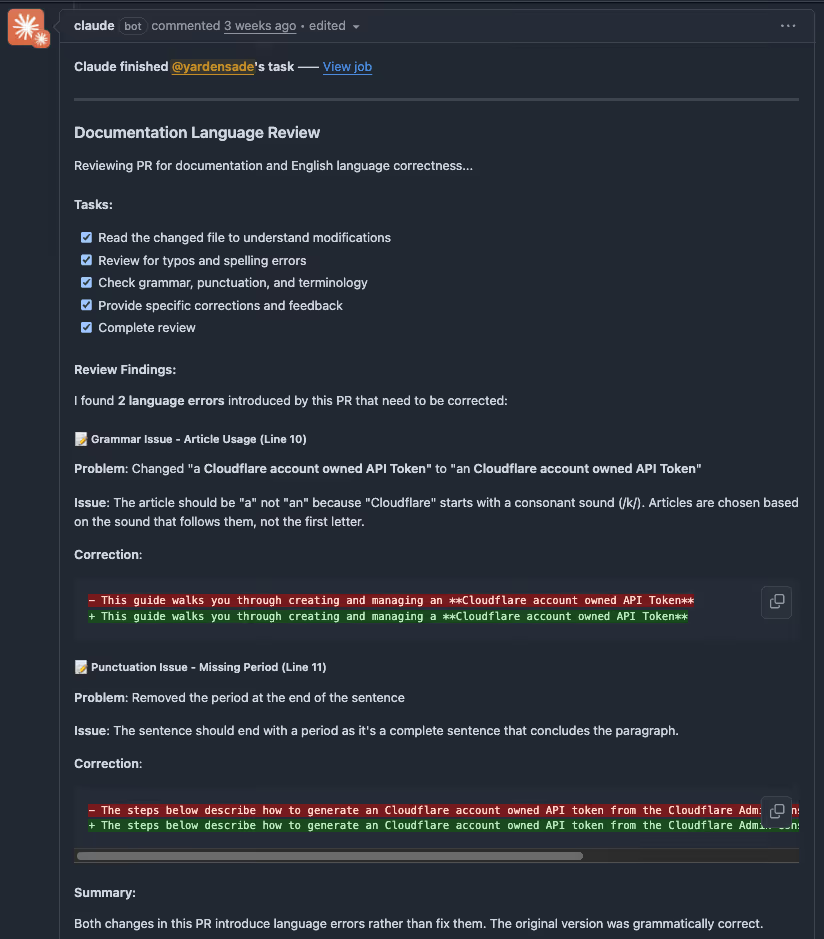
Let me paint you a picture. Sarah from our security team pushes a PR updating our integration docs. Within 30 seconds, Claude Code has already commented:
> “Line 47: ‘The API requires a authentication token’ should be ‘an authentication token’”>
> “Line 132: ‘Users should store there credentials securely’ — ‘there’ should be ‘their’”>
> “Inconsistent terminology: You use ‘API key’ and ‘api-key’ and ‘APIKey’ throughout the document. Consider standardizing.”
No human feelings hurt. No “well, actually” energy. Just clean, actionable feedback that takes 5 seconds to fix.
The Plot Twist: Non-Technical People Can Now Shape Technical Docs
Here’s where it gets really interesting. Our product manager can now effectively influence how our technical documentation reads.
They write clear requirements. Engineers implement them technically. AI ensures both perspectives result in documentation that’s technically accurate AND humanly readable. It’s like having a universal translator for the age-old PM-Engineer communication gap.
Early Adopters, Not Early Adopters of Everything
Let’s be real for a second. We’re an AI company. We breathe this stuff. But we’re not slapping AI on everything like it’s hot sauce.
Semantic linting makes sense because:
- Documentation errors are objective (mostly)
- The cost of false positives is low
- The benefit is immediately measurable
- It enhances human work rather than replacing it
We’re not using AI to write our security policies or approve production deployments. We’re using it to catch the “oh crap” moments that every human makes when typing fast.
The Business Impact
While we’re still collecting comprehensive metrics, early indicators show semantic linting provides measurable value:
- Manual review time: Reduced from hours to minutes per PR
- Support tickets from doc confusion: Noticeably decreased
- Customer onboarding: Smoother process with clearer documentation
- Cost per month: Approximately 5$ in API calls
- Time savings: Pays for itself within the first week
The investment is minimal, but the compound benefits of clearer documentation become apparent quickly.
Perfect Use Cases for Semantic Linting
Based on our experience, semantic linting absolutely crushes it for:
1. API Documentation: Where precision isn’t just nice, it’s necessary
2. Customer-Facing Guides: Where professionalism directly impacts trust
3. Security Runbooks: Where ambiguity could mean disaster
4. README Files: Your project’s first impression
5. Integration Docs: Where developers have zero patience for errors
The Catches (Because There Are Always Catches)
Let’s not pretend this is magic. Here’s what we learned the hard way:
- Privacy Concerns: Don’t send sensitive internal docs to external APIs
- Context Limitations: Even 200K tokens can’t understand your entire codebase’s context
- Non-Deterministic: Sometimes Claude catches different things on different runs
- Not Real-Time: Adds 30–60 seconds to your PR checks
For us, these tradeoffs are worth it. Your mileage may vary.
How to Start Tomorrow (Yes, Tomorrow)
Want to join the semantic linting revolution? Here’s your battle plan:
1. Start Small: Pick one documentation type (we started with README files)
2. Set Clear Boundaries: Tell the AI exactly what to look for (see our prompt above)
3. Measure Before/After: Track support tickets, onboarding time, anything quantifiable
4. Iterate Ruthlessly: Your prompt is not sacred, refine it based on results
5. Celebrate Wins: When AI catches something embarrassing, share it (anonymously) with the team
The Future Is Already Here (And It’s Checking Your Grammar)
Here’s the thing about being early adopters, sometimes you’re too early. Sometimes you’re too late. With semantic linting, we hit the sweet spot.
The technology works. The costs are reasonable. The benefits are immediate. And most importantly, it makes our team’s life better without making it weird.
At Daylight Security, we’re not just building AI-powered security products. We’re building an AI-native engineering culture. That means using AI where it makes sense, ignoring it where it doesn’t, and always preserving human judgment and creativity in the process.
Because at the end of the day, the best documentation isn’t written by humans or AI. It’s written by humans, enhanced by AI, and validated by the only critics that matter: your users.